mirror of
https://github.com/storytold/vectorcraft.git
synced 2026-10-14 19:26:56 -04:00

283 lines
17 KiB
Markdown
283 lines
17 KiB
Markdown
<p align="center">
|
||
<a href="https://getartcraft.com/">
|
||
<picture>
|
||
<source media="(prefers-color-scheme: dark)" srcset="docs/brand/artcraft-logo-white.svg">
|
||
<img alt="ArtCraft" src="docs/brand/artcraft-logo.svg" width="200">
|
||
</picture>
|
||
</a>
|
||
</p>
|
||
|
||
|
||
<h1 align="center">VectorCraft</h1>
|
||
|
||
<p align="center">
|
||
<b>Vector illustration; an open-source, clean-room reimplementation of Adobe Illustrator, rebuilt in pure Rust.</b>
|
||
</p>
|
||
|
||
<p align="center">
|
||
A fast, open-source, clean-room take on the Adobe Illustrator workflow. It runs natively on
|
||
macOS, Windows, Linux and FreeBSD, and in the browser via WebAssembly. Built by the ArtCraft team.
|
||
</p>
|
||
|
||
<p align="center">
|
||
<img alt="Status: in active development" src="https://img.shields.io/badge/status-in%20active%20development-e8573f">
|
||
<img alt="Written in pure Rust" src="https://img.shields.io/badge/pure-Rust-b83a24?logo=rust&logoColor=white">
|
||
<img alt="Runs on macOS, Windows, Linux, FreeBSD and the web" src="https://img.shields.io/badge/runs%20on-macOS%20%C2%B7%20Windows%20%C2%B7%20Linux%20%C2%B7%20FreeBSD%20%C2%B7%20Web-555555">
|
||
<img alt="MCP server for agents" src="https://img.shields.io/badge/agents-MCP%20server-555555">
|
||
<img alt="License: MIT OR Apache-2.0" src="https://img.shields.io/badge/license-MIT%20OR%20Apache--2.0-555555">
|
||
</p>
|
||
|
||
<p align="center">
|
||
<a href="https://discord.gg/artcraft"><img alt="Join the ArtCraft community on Discord" src="https://img.shields.io/badge/Join%20us%20on%20Discord-5865F2?style=for-the-badge&logo=discord&logoColor=white" height="40"></a>
|
||
</p>
|
||
|
||
<p align="center">
|
||
<a href="https://getartcraft.com/apps/vectorcraft"><b>VectorCraft on getartcraft.com</b></a> ·
|
||
<a href="https://getartcraft.com/">ArtCraft</a> ·
|
||
<a href="https://getartcraft.com/apps">All Crafting Apps</a>
|
||
</p>
|
||
|
||
<br>
|
||
|
||
<p align="center">
|
||
<img src="docs/images/shot-1-neon.png" alt="VectorCraft editing the Neon Drive poster: the title is selected, the Appearance panel shows the settings of its live Outer Glow, and the Properties panel shows its character settings" width="100%">
|
||
<br><sub><b>Neon Drive</b>: a Pathfinder-cut sun, live Outer Glow on the type and grid, and clipping masks · <code>examples/neon-drive.vectorcraft</code></sub>
|
||
</p>
|
||
|
||
> [!NOTE]
|
||
> **ArtCraft is a community of artists from all walks of life.** Digital, generative, music,
|
||
> games — if you make things, you're one of us. **[Come say hi on Discord](https://discord.gg/artcraft).**
|
||
|
||
<p align="center">
|
||
<a href="#a-look-around">A look around</a> ·
|
||
<a href="#made-in-vectorcraft">Made in VectorCraft</a> ·
|
||
<a href="#why-vectorcraft">Why VectorCraft</a> ·
|
||
<a href="#quick-start">Quick start</a> ·
|
||
<a href="#status">Status</a> ·
|
||
<a href="#the-crafting-apps">The Crafting Apps</a> ·
|
||
<a href="#license-and-credits">License</a>
|
||
</p>
|
||
|
||
## A look around
|
||
|
||
<table>
|
||
<tr>
|
||
<td width="50%" valign="top">
|
||
<img src="docs/images/shot-2-ribbons.png" alt="Three live blend ribbons clipped to the artboard, one selected with its key paths showing; the Layers panel lists the clip group, the blends and the selected blend's two key paths" width="100%">
|
||
<p align="center"><sub><b>Live Blends and Layers</b>: editable key paths, smooth colour, every object a row</sub></p>
|
||
</td>
|
||
<td width="50%" valign="top">
|
||
<img src="docs/images/shot-4-bezier.png" alt="Direct Selection tool showing anchor points and Bézier handles on a crescent built with Pathfinder, with the contextual task bar below it" width="100%">
|
||
<p align="center"><sub><b>Pen and Direct Selection</b>: real Bézier anchors and handles, plus a contextual task bar</sub></p>
|
||
</td>
|
||
</tr>
|
||
<tr>
|
||
<td width="50%" valign="top">
|
||
<img src="docs/images/shot-5-perspective.png" alt="Two lit building facades drawn on the left and right planes of a two-point perspective grid at sunset, with the Perspective Selection tool and the Plane Switching Widget" width="100%">
|
||
<p align="center"><sub><b>Perspective Grid</b>: art attached to its planes stays editable in perspective · <code>examples/perspective-city.vectorcraft</code></sub></p>
|
||
</td>
|
||
<td width="50%" valign="top">
|
||
<img src="docs/images/shot-3-sheet.png" alt="Four artboards in the light UI theme: Pathfinder, Gradient Mesh, radial Repeat and Envelope Distort" width="100%">
|
||
<p align="center"><sub><b>Multiple artboards, light theme</b>: Pathfinder · Gradient Mesh · live radial Repeat · Envelope Distort · <code>examples/feature-sheet.vectorcraft</code></sub></p>
|
||
</td>
|
||
</tr>
|
||
</table>
|
||
|
||
## Made in VectorCraft
|
||
|
||
Every piece below was built entirely through VectorCraft's command API, the same one the MCP server
|
||
exposes to agents, and exported by VectorCraft's own renderer. The source files are in
|
||
[`examples/`](examples).
|
||
|
||
<table>
|
||
<tr>
|
||
<td width="50%" valign="top">
|
||
<img src="docs/images/art-neon-drive.png" alt="Neon Drive synthwave poster: a striped orange sun setting between purple mountains over a glowing pink grid" width="100%">
|
||
<p align="center"><sub><b>Neon Drive</b>: synthwave poster with glowing type and grid</sub></p>
|
||
</td>
|
||
<td width="50%" valign="top">
|
||
<img src="docs/images/dusk-poster.png" alt="Dusk poster: a gradient sky with stars and birds, a glowing sun behind layered purple mountains and pine trees" width="100%">
|
||
<p align="center"><sub><b>Dusk</b>: gradient sky, glowing sun, layered mountains</sub></p>
|
||
</td>
|
||
</tr>
|
||
<tr>
|
||
<td colspan="2" valign="top">
|
||
<img src="docs/images/art-ribbons.png" alt="Live Blends: three wide ribbons blending yellow to pink and teal to purple, crossing over a dark background" width="100%">
|
||
<p align="center"><sub><b>Live Blends</b>: 70 steps, smooth colour, editable spines</sub></p>
|
||
</td>
|
||
</tr>
|
||
<tr>
|
||
<td width="50%" valign="top">
|
||
<img src="docs/images/art-repeat.png" alt="Radial Repeat mandala: teal petals around a coral center, ringed by yellow dots" width="100%">
|
||
<p align="center"><sub><b>Radial Repeat</b>: a live mandala</sub></p>
|
||
</td>
|
||
<td width="50%" valign="top">
|
||
<img src="docs/images/art-envelope.png" alt="Envelope Distort: rainbow stripes and the word WARP bent into a waving flag" width="100%">
|
||
<p align="center"><sub><b>Envelope Distort</b>: striped type warped into a flag</sub></p>
|
||
</td>
|
||
</tr>
|
||
<tr>
|
||
<td width="50%" valign="top">
|
||
<img src="docs/images/art-mesh.png" alt="Gradient Mesh: three softly shaded purple, pink and cyan spheres on a dark background" width="100%">
|
||
<p align="center"><sub><b>Gradient Mesh</b>: shaded spheres</sub></p>
|
||
</td>
|
||
<td width="50%" valign="top">
|
||
<img src="docs/images/art-pathfinder.png" alt="Pathfinder: a purple gradient crescent moon and three orange stars on a peach background" width="100%">
|
||
<p align="center"><sub><b>Pathfinder</b>: a crescent and stars from exact booleans</sub></p>
|
||
</td>
|
||
</tr>
|
||
</table>
|
||
|
||
## Why VectorCraft
|
||
|
||
- **Familiar.** Illustrator's layout, tools, menus, panels and shortcuts: the Pen, Direct Selection,
|
||
Pathfinder, Smart Guides, Appearance, Swatches, Layers and more. You already know how to use it.
|
||
- **Fast.** Multithreaded SIMD rendering off the UI thread. 20,000 shapes render in about 27 ms at
|
||
full retina resolution while the interface stays at 120 fps.
|
||
- **Robust.** Exact curve booleans (no "cannot perform operation"), unlimited undo via structural
|
||
sharing, and property-tested file round trips.
|
||
- **Open.** A documented native format (`.vectorcraft`, JSON), first-class SVG, PDF (and
|
||
PDF-compatible `.ai`) import and export, PNG/JPEG/WebP export, Export for Screens, and SVGZ,
|
||
templates, GIF, TIFF and BMP on open.
|
||
- **Agent-native.** Every menu item, tool gesture, panel and dialog can be driven over a JSON
|
||
control channel and an **MCP server**, so Claude and other agents can draw, edit and export the
|
||
way a person does.
|
||
- **Everywhere.** One codebase for the desktop apps and the same UI in the browser.
|
||
|
||
## Quick start
|
||
|
||
```sh
|
||
cargo run --release -p vectorcraft # desktop app
|
||
cargo run --release -p vectorcraft -- examples/dusk-poster.vectorcraft
|
||
cargo run --release -p vectorcraft -- --control 7979 # + JSON control channel
|
||
cargo run --release -p vectorcraft-cli -- mcp # MCP server (stdio)
|
||
cargo run --release -p vectorcraft-cli -- run --in examples/ribbons.vectorcraft --export out.pdf # headless batch
|
||
cargo run --release -p vectorcraft-cli -- bench examples/neon-drive.vectorcraft # render timing
|
||
cargo xtask bundle # dist/VectorCraft.app (macOS)
|
||
cd apps/vectorcraft-web && trunk build --release # web build → dist/web
|
||
cargo xtask ci # fmt, clippy, tests, layering, wasm, vendor names
|
||
```
|
||
|
||
Japanese fonts come from [storytold/craft-fonts](https://github.com/storytold/craft-fonts), an optional
|
||
build input (releases always use it): `CRAFT_FONTS_DIR="$PWD/../craft-fonts" cargo run --release -p vectorcraft` (an absolute path).
|
||
Without it, Japanese text uses the installed system fonts. See [`docs/development.md`](docs/development.md#fonts-craft-fonts-optional-build-input).
|
||
|
||
On laptops with two graphics processors, VectorCraft uses the power-saving (integrated) one by default.
|
||
To use the discrete one, choose **Preferences › Performance › Graphics Processor › High Performance**
|
||
and restart, or start the app with `WGPU_POWER_PREF=high` (see [`docs/development.md`](docs/development.md#desktop-graphics-processor)).
|
||
|
||
### Use it from Claude Code and other agents
|
||
|
||
Register the MCP server with Claude Code:
|
||
|
||
```sh
|
||
claude mcp add vectorcraft -- /path/to/vectorcraft-cli mcp
|
||
```
|
||
|
||
The details are in [`docs/mcp.md`](docs/mcp.md) and [`docs/control-protocol.md`](docs/control-protocol.md).
|
||
|
||
For the experimental, unsupported 64-bit Windows 7 build, see [Windows 7 instructions](docs/windows7.md).
|
||
|
||
## Status
|
||
|
||
VectorCraft is under active development. [**ROADMAP.md**](ROADMAP.md) covers what ships today, the
|
||
milestones, and honest time-to-parity estimates.
|
||
|
||
**Where we are (2026-10-07):** roughly 69–75% of Illustrator's features exist and work, and about 40–55% of
|
||
"a power user can't tell the difference". Everyday vector illustration is close to usable: drawing and path tools,
|
||
Pathfinder and Shape Builder, paint, gradients, appearance and transparency, type with styles, threading and Hebrew/Arabic bidirectional layout, and
|
||
files (SVG, PDF and PDF-compatible `.ai` with PDF/X, EPS, DXF, EMF/WMF, raster formats and PSD, Print, Package). The interface
|
||
speaks English, Japanese, Traditional and Simplified Chinese and Spanish (and Czech and Brazilian Portuguese in the menus).
|
||
The scores are
|
||
self-assessed, so the [honest assessment](ROADMAP.md#honest-assessment-2026-10-05) explains how far to trust them.
|
||
|
||
**What's missing:**
|
||
- 3D and Materials;
|
||
- the Photoshop-style raster effects (Effect Gallery);
|
||
- CJK composition for vertical type (vertical type itself has initial support, with a Japanese interface);
|
||
- Variables and scripting;
|
||
- an interaction-fidelity pass covering every tool's modifiers and small behaviours;
|
||
- packaging for Windows and Linux.
|
||
|
||
**Where we're going:** next is the interaction-fidelity pass alongside the raster-effects package, then 3D and
|
||
advanced type, then hardening and packaging for 1.0. The prioritized list is in
|
||
[Where we're lacking](ROADMAP.md#where-were-lacking-in-priority-order).
|
||
|
||
**Workspace:** `crates/{geom, color, doc, pathops, text, effects, trace, brush, render, svg, pdf, eps, cad, metafile, format, tools, engine, ui-egui, mcp, testkit}`
|
||
and `apps/{vectorcraft, vectorcraft-cli, vectorcraft-web}`. The egui frontend is its own crate, so
|
||
the UI can be swapped without touching the engine.
|
||
|
||
Agent and contributor rules (clean-room, the asset policy, no panics in shipped code, quality gates) are in
|
||
[`AGENTS.md`](AGENTS.md); [`docs/development.md`](docs/development.md#robustness-vectorcraft-never-crashes)
|
||
explains how VectorCraft avoids crashing, and [`docs/releasing.md`](docs/releasing.md) how releases are built,
|
||
signed and published. Every bundled asset is listed with its licence in [`ASSETS.md`](ASSETS.md).
|
||
|
||
## The Crafting Apps
|
||
|
||
VectorCraft is one of the **Crafting Apps**: free, open-source creative tools from the
|
||
[ArtCraft](https://getartcraft.com/) team, each written from scratch in Rust and each able to
|
||
stand on its own.
|
||
|
||
| | App | What it's for | Code | Learn more |
|
||
|:-:|---|---|---|---|
|
||
| <img src="https://raw.githubusercontent.com/storytold/photocraft/main/assets/app-icon/hicolor/64x64/apps/ai.storyteller.photocraft.png" alt="" width="32" height="32"> | **PhotoCraft** | Image editing: layers, masks, type and real PSD files | [GitHub](https://github.com/storytold/photocraft) | [Website](https://getartcraft.com/apps/photocraft) |
|
||
| <img src="https://raw.githubusercontent.com/storytold/vectorcraft/main/assets/app-icon/hicolor/64x64/apps/ai.storyteller.vectorcraft.png" alt="" width="32" height="32"> | **VectorCraft** | **Vector illustration · you are here** | [GitHub](https://github.com/storytold/vectorcraft) | [Website](https://getartcraft.com/apps/vectorcraft) |
|
||
| <img src="https://raw.githubusercontent.com/storytold/filmcraft/main/assets/app-icon/hicolor/64x64/apps/ai.storyteller.filmcraft.png" alt="" width="32" height="32"> | **FilmCraft** | Video editing, color and sound | [GitHub](https://github.com/storytold/filmcraft) | [Website](https://getartcraft.com/apps/filmcraft) |
|
||
| <img src="https://raw.githubusercontent.com/storytold/lightcraft/main/assets/app-icon/hicolor/64x64/apps/ai.storyteller.lightcraft.png" alt="" width="32" height="32"> | **LightCraft** | Photo library and raw development | [GitHub](https://github.com/storytold/lightcraft) | [Website](https://getartcraft.com/apps/lightcraft) |
|
||
| <img src="https://raw.githubusercontent.com/storytold/pdfcraft/main/assets/app-icon/hicolor/64x64/apps/ai.storyteller.pdfcraft.png" alt="" width="32" height="32"> | **PdfCraft** | Reading, organizing and protecting PDFs | [GitHub](https://github.com/storytold/pdfcraft) | [Website](https://getartcraft.com/apps/pdfcraft) |
|
||
| <img src="https://raw.githubusercontent.com/storytold/effectcraft/main/assets/app-icon/hicolor/64x64/apps/ai.storyteller.effectcraft.png" alt="" width="32" height="32"> | **EffectCraft** | Motion graphics and visual effects | [GitHub](https://github.com/storytold/effectcraft) | [Website](https://getartcraft.com/apps/effectcraft) |
|
||
| <img src="https://raw.githubusercontent.com/storytold/designcraft/main/assets/app-icon/hicolor/64x64/apps/ai.storyteller.designcraft.png" alt="" width="32" height="32"> | **DesignCraft** | Page layout and publishing | [GitHub](https://github.com/storytold/designcraft) | [Website](https://getartcraft.com/apps/designcraft) |
|
||
|
||
And [**ArtCraft**](https://getartcraft.com/) itself, our AI image and video studio for artists who want real control.
|
||
|
||
<br>
|
||
|
||
<p align="center">
|
||
<a href="https://discord.gg/artcraft"><img alt="Join the ArtCraft community on Discord" src="https://img.shields.io/badge/Join%20us%20on%20Discord-5865F2?style=for-the-badge&logo=discord&logoColor=white" height="40"></a>
|
||
</p>
|
||
|
||
<h3 align="center">Come make things with us</h3>
|
||
|
||
<p align="center">
|
||
Our Discord is where artists of every kind hang out: people who paint, shoot, draw, cut film,
|
||
set type, and people still figuring out what they like to make. Share what you're working on,
|
||
ask for help, tell us what's broken, or tell us what you wish these tools could do.
|
||
Whatever your medium and however long you've been at it, you're welcome here.
|
||
</p>
|
||
|
||
<p align="center">
|
||
<a href="https://discord.gg/artcraft"><b>discord.gg/artcraft</b></a> ·
|
||
<a href="https://getartcraft.com/">getartcraft.com</a> ·
|
||
<a href="https://getartcraft.com/apps">The Crafting Apps</a> ·
|
||
<a href="https://getartcraft.com/apps/vectorcraft">VectorCraft</a>
|
||
</p>
|
||
|
||
## Star history
|
||
|
||
[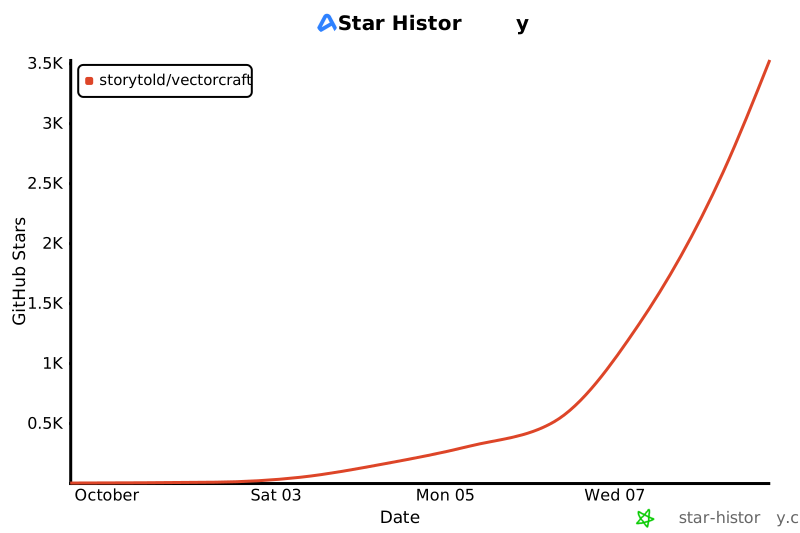](https://www.star-history.com/?repos=storytold%2Fvectorcraft&type=date&legend=top-left)
|
||
|
||
## License and credits
|
||
|
||
VectorCraft is dual-licensed under [MIT](LICENSE-MIT) or [Apache-2.0](LICENSE-APACHE), at your option.
|
||
Copyright (c) 2026 ArtCraft Team and the VectorCraft contributors. Required notices are in [NOTICE](NOTICE).
|
||
|
||
Bundled fonts, icons, images and other assets keep their own open licenses; each one is listed
|
||
with its author, source and license in [ASSETS.md](ASSETS.md). Release builds also embed the
|
||
fonts of [craft-fonts](https://github.com/storytold/craft-fonts/blob/main/ATTRIBUTION.md) (Japanese,
|
||
Simplified Chinese and Arabic faces; SIL Open Font License 1.1).
|
||
|
||
The app icon (an engraved dragon on VectorCraft red, `#e8573f`) is the owner's original artwork; its
|
||
palette and files are in [`assets/app-icon/`](assets/app-icon/README.md).
|
||
|
||
The ArtCraft name, wordmark and logos in [`docs/brand/`](docs/brand/) are trademarks of the
|
||
ArtCraft Team and are not covered by this license. They may be used only unmodified, and only as
|
||
part of this repository and VectorCraft, under [`docs/brand/LICENSE-brand.txt`](docs/brand/LICENSE-brand.txt).
|
||
Forks and modified versions must remove them.
|
||
|
||
<sub>Adobe, Photoshop, Illustrator, Premiere Pro, Lightroom, Acrobat, After Effects and InDesign are trademarks or registered trademarks of Adobe Inc. in the United States and/or other countries. VectorCraft is an independent, open-source project and is not affiliated with, sponsored by or endorsed by Adobe Inc.; these names are used only to describe the workflows it is compatible with.</sub>
|
||
|
||
<p align="center">
|
||
<a href="https://getartcraft.com/"><img alt="ArtCraft" src="docs/brand/artcraft-mark.svg" width="28"></a><br>
|
||
<sub>Made by the <a href="https://getartcraft.com/">ArtCraft</a> team and community.</sub>
|
||
</p>
|