mirror of
https://github.com/storytold/effectcraft.git
synced 2026-10-14 19:27:05 -04:00

377 lines
23 KiB
Markdown
377 lines
23 KiB
Markdown
<p align="center">
|
|
<a href="https://getartcraft.com/">
|
|
<picture>
|
|
<source media="(prefers-color-scheme: dark)" srcset="docs/brand/artcraft-logo-white.svg">
|
|
<img alt="ArtCraft" src="docs/brand/artcraft-logo.svg" width="200">
|
|
</picture>
|
|
</a>
|
|
</p>
|
|
|
|
|
|
<h1 align="center">EffectCraft</h1>
|
|
|
|
<p align="center">
|
|
<b>Motion graphics and visual effects; an open-source, clean-room reimplementation of Adobe After Effects, rebuilt in pure Rust.</b>
|
|
</p>
|
|
|
|
<p align="center">
|
|
A free, open-source compositor in the spirit of After Effects: compositions, layers,
|
|
keyframes, 306 effects, layer styles, expressions, 3D cameras and lights, and a render queue, native on macOS,
|
|
Windows and Linux, and in the browser. Young, moving fast, and already usable.
|
|
</p>
|
|
|
|
<p align="center">
|
|
<img alt="Status: young and moving fast" src="https://img.shields.io/badge/status-young%20and%20moving%20fast-e0368f?style=flat-square">
|
|
<img alt="Written in Rust" src="https://img.shields.io/badge/rust-1.95%2B-b0206c?style=flat-square&logo=rust&logoColor=white">
|
|
<img alt="License: MIT OR Apache-2.0" src="https://img.shields.io/badge/license-MIT%20%2F%20Apache--2.0-555?style=flat-square">
|
|
</p>
|
|
|
|
<p align="center">
|
|
<a href="https://discord.gg/artcraft"><img alt="Join the ArtCraft community on Discord" src="https://img.shields.io/badge/Join%20us%20on%20Discord-5865F2?style=for-the-badge&logo=discord&logoColor=white" height="40"></a>
|
|
</p>
|
|
|
|
<p align="center">
|
|
<a href="https://getartcraft.com/apps/effectcraft"><b>EffectCraft on getartcraft.com</b></a> ·
|
|
<a href="https://getartcraft.com/">ArtCraft</a> ·
|
|
<a href="https://getartcraft.com/apps">All Crafting Apps</a>
|
|
</p>
|
|
|
|
<br>
|
|
|
|
<p align="center">
|
|
<img src="docs/images/effectcraft-hero.png" alt="EffectCraft's main window: the animated demo composition in the Composition panel, the Project panel, a Timeline with text, shape and solid layers, and the Properties panel showing the selected text layer's transform, font and paragraph settings" width="100%">
|
|
</p>
|
|
|
|
> [!NOTE]
|
|
> **ArtCraft is a community of artists from all walks of life.** Digital, generative, music,
|
|
> games — if you make things, you're one of us. **[Come say hi on Discord](https://discord.gg/artcraft).**
|
|
|
|
<p align="center">
|
|
<a href="#what-effectcraft-is">What it is</a> ·
|
|
<a href="#animate">Animate</a> ·
|
|
<a href="#effects">Effects</a> ·
|
|
<a href="#3d">3D</a> ·
|
|
<a href="#export">Export</a> ·
|
|
<a href="#built-for-agents">Agents</a> ·
|
|
<a href="#get-started">Get started</a> ·
|
|
<a href="#where-it-stands">Status</a> ·
|
|
<a href="#how-its-made">How it's made</a> ·
|
|
<a href="#downloads">Downloads</a> ·
|
|
<a href="#the-crafting-apps">The Crafting Apps</a> ·
|
|
<a href="#license-and-credits">License</a>
|
|
</p>
|
|
|
|
## What EffectCraft is
|
|
|
|
EffectCraft is for animated titles, motion graphics and compositing work: the kind of thing
|
|
people reach for After Effects to do. You build a composition out of layers (solids, shapes,
|
|
text, footage, other compositions), animate their properties with keyframes, stack effects on
|
|
them and render the result.
|
|
|
|
The aim is to feel familiar to anyone who has used After Effects, with the same panels (Project,
|
|
Composition, Timeline, Effect Controls, Effects & Presets) and the same keyframe behaviour, and
|
|
then to go further in a few places where it matters to us:
|
|
|
|
- **Lottie import and export built in**, so animations can go straight to the web and apps
|
|
without a plugin.
|
|
- **A project file you can read.** Projects are versioned JSON (`.ecproj`), so they diff cleanly
|
|
in version control.
|
|
- **Everything is scriptable.** Every menu item, timeline drag and property edit goes through one
|
|
command registry, so the same actions are reachable from a command line, a JSON control
|
|
channel and an MCP server for agents.
|
|
- **No FFmpeg.** Video and audio decoding and encoding are pure Rust: FilmCraft's codecs and
|
|
EffectCraft's own VP9, AV1, HEVC and Opus encoders.
|
|
|
|
## Animate
|
|
|
|
The panels, menus and shortcuts follow After Effects, so your muscle memory carries over:
|
|
Project, Composition, Timeline, Effect Controls, Properties, Effects & Presets, Character,
|
|
Paragraph, Align, Info, Preview, Audio and the Render Queue, docked the way you expect. Drag
|
|
footage, comps and effects between them: onto the comp viewer, where they land under the pointer,
|
|
or into the Timeline, between layers and at the time you point to.
|
|
|
|
- **Layers of every kind:** solids, shapes, text, footage, nested compositions, nulls,
|
|
adjustment layers, cameras and lights; parenting, track mattes, all 38 blend modes, motion blur.
|
|
- **Keyframes that behave the same:** linear, Bezier, hold, auto and continuous Bezier, roving
|
|
keys, Easy Ease (F9), Keyframe Velocity and Interpolation dialogs, copy and paste at the current
|
|
time, and a **Graph Editor** with value and speed graphs and draggable handles.
|
|
- **Time:** time remapping, time stretch, time-reverse, freeze frame, work area, markers, exact
|
|
frame-accurate timing at every frame rate including 29.97 drop-frame.
|
|
- **Shapes and masks:** shape layers with trim paths, repeaters, round corners, offset, zig zag,
|
|
twist, wiggle, merge paths and gradient strokes; masks drawn with the pen tool, with modes,
|
|
feather, expansion and vertex editing in the viewer.
|
|
- **Text:** point and paragraph text with real shaping in any font installed on your machine, the
|
|
Character and Paragraph panels, and text animators with range selectors.
|
|
- **Expressions:** JavaScript with the After Effects object model (`wiggle`, `loopOut`,
|
|
`thisComp.layer("…")`, vector maths on arrays), an inline editor and the pick-whip.
|
|
- **Timeline like you know it:** twirl layers open to Transform, masks, effects and the rest; drag
|
|
rows to reorder layers; rename with Enter or a double-click; the property shortcuts (A, P, S,
|
|
R, T, M, F, E, L, U and their double presses AA, PP, SS, RR, TT, MM, FF, EE, LL, UU), Shift to
|
|
add properties, Alt+Shift+A/P/S/R/T to key the current time, Ctrl+` to twirl selected layers.
|
|
- **Puppet tools:** Position, Advanced, Bend, Starch and Overlap pins on a mesh built from the
|
|
layer, real-time pin recording, rotate/scale handles, pins driven by (or carrying) nulls for
|
|
rigging, and follow-through for hair and cloth.
|
|
|
|
<p align="center">
|
|
<img src="docs/images/effectcraft-graph-editor.png" alt="The Graph Editor showing an eased value curve for a text animator's Range Start, with the graph editor's button bar for hold, linear, auto Bezier and Easy Ease" width="100%">
|
|
</p>
|
|
|
|
## Effects
|
|
|
|
306 effects (every one of After Effects' 298, and more) across its categories, each with its parameter names, order and
|
|
defaults: blur and sharpen, channel, color correction (Curves, Levels, Hue/Saturation, Lumetri
|
|
Color…), distort (Warp, Bulge, Turbulent Displace, CC Power Pin…), generate (Fractal Noise,
|
|
Gradient Ramp, Stroke, Write-on, Audio Spectrum…), keying, matte, noise and grain, perspective,
|
|
**simulation** (CC Particle World, CC Rainfall, Shatter, Card Dance, Caustics, Wave World…),
|
|
stylize (Glow, CC Glass…), **time** (Echo, Posterize Time, Timewarp, Time Displacement…),
|
|
**audio** (Reverb, Parametric EQ, Delay, Stereo Mixer…), text, transitions, utility and expression
|
|
controls. All nine **Layer Styles** (Drop Shadow, Inner/Outer Glow, Bevel and Emboss, Satin,
|
|
overlays, Stroke) with Global Light. Preview plays audio in sync, with meters and waveforms.
|
|
|
|
<p align="center">
|
|
<img src="docs/images/effectcraft-effects.png" alt="A CC Particle World burst with Glow, and the Effect Controls panel listing the particle system's parameters" width="100%">
|
|
</p>
|
|
|
|
## 3D
|
|
|
|
Classic 3D the way After Effects does it: 3D layers with orientation and material options,
|
|
one- and two-node **cameras** with depth of field, **lights** (parallel, spot, point, ambient)
|
|
with soft ray-traced shadows, layers that intersect correctly, orbit, pan and dolly camera
|
|
tools, and Front, Top, Left and Custom views.
|
|
|
|
<p align="center">
|
|
<img src="docs/images/effectcraft-3d.png" alt="The 3D Showcase demo in Custom View 1: intersecting cards lit by a spot light with soft shadows on a gridded floor, with the camera frustum and light drawn as wireframes" width="100%">
|
|
</p>
|
|
|
|
## Export
|
|
|
|
A Render Queue like After Effects', with Render Settings and Output Modules: **H.264** MP4 and
|
|
**ProRes** MOV (Proxy to 4444 XQ with alpha) with audio, **HEVC** (Main / Main 10) and **AV1**
|
|
MP4, **WebM** (VP9 with inter frames and alpha, or AV1; Opus audio), PNG, JPEG, TIFF and 32-bit EXR sequences, animated GIF and WAV/AIFF. Field
|
|
rendering with 3:2 pulldown, effect/solo/guide/depth overrides, crop, region of interest and
|
|
resize, Render Settings and Output Module templates with defaults, post-render actions, storage
|
|
overflow and render logs. The same queue runs from the command line. Every encoder is pure
|
|
Rust (FilmCraft's H.264, ProRes and AAC; EffectCraft's own VP9, AV1, HEVC and Opus); there is no
|
|
FFmpeg inside.
|
|
|
|
**Lottie** goes both ways: File ▸ Export ▸ Lottie JSON… writes a composition (precomps, shape,
|
|
solid, image, text and null layers, eased and spatial keyframes, masks, track mattes, blend
|
|
modes, time remapping, optionally expressions) as `.json` or `.lottie`, and lists anything Lottie
|
|
cannot express; File ▸ Import ▸ Lottie… opens one as a new composition.
|
|
|
|
<p align="center">
|
|
<img src="docs/images/effectcraft-render-queue.png" alt="The Render Queue panel with two compositions queued" width="100%">
|
|
</p>
|
|
|
|
## Built for agents
|
|
|
|
Everything you can do from a menu is a command with an id, and agents can reach every one of
|
|
them:
|
|
|
|
- **MCP server:** `effectcraft-cli mcp` speaks the Model Context Protocol over stdio, headless
|
|
or bridged to the running app (`--bridge 9877`). Tools cover commands, the project and property
|
|
tree, keyframes and rendered frames. This repository ships a ready [`.mcp.json`](.mcp.json).
|
|
- **Command line:** one-shot calls with JSON output, for example
|
|
`effectcraft-cli set Main '#1' transform/position '[100,360]' --time 0 main.ecproj --save`
|
|
or `effectcraft-cli render --comp Main --out main.mp4`, or
|
|
`effectcraft-cli exec file.exportLottie '{"comp":"Main","path":"main.json"}' main.ecproj`.
|
|
- **Control channel:** `effectcraft --control 9877` accepts JSON lines to run commands, inspect
|
|
and click any widget by its automation id, and take screenshots.
|
|
|
|
See [docs/agents.md](docs/agents.md) and [docs/control-protocol.md](docs/control-protocol.md).
|
|
|
|
## Get started
|
|
|
|
Installers for each version are on the [Releases](https://github.com/storytold/effectcraft/releases)
|
|
page: a universal macOS app; Windows MSIs and portable zips for x64, x86 and ARM64; Linux
|
|
AppImage, Flatpak, deb, rpm and tar.gz for x86_64 and aarch64; a FreeBSD x86_64 tarball; and the
|
|
web build. [Downloads](#downloads) lists every file. The Windows ARM64 build runs natively on
|
|
Windows on ARM, without x64 emulation. CI installs that MSI on Windows 11 ARM64 hardware, checks
|
|
both programs are ARM64 and runs the command-line tool there, but it doesn't open the app's window
|
|
or run the test suite natively on ARM64 yet, so please report anything that behaves differently.
|
|
|
|
On Gentoo, the community [::snakebyte overlay](https://github.com/switch87/snakebyte-overlay) packages
|
|
the Linux release as `media-video/effectcraft-bin` (not maintained by the EffectCraft team):
|
|
|
|
```sh
|
|
eselect repository add snakebyte git https://github.com/switch87/snakebyte-overlay.git
|
|
emaint sync -r snakebyte
|
|
echo 'media-video/effectcraft-bin ~amd64' >> /etc/portage/package.accept_keywords/effectcraft
|
|
emerge --ask media-video/effectcraft-bin
|
|
```
|
|
|
|
To build it yourself you need [Rust](https://rustup.rs/) 1.95 or newer.
|
|
|
|
```sh
|
|
git clone https://github.com/storytold/effectcraft
|
|
cd effectcraft
|
|
cargo run --release -p effectcraft # the app (add `-- --demo` to open the demo project)
|
|
cargo run --release -p effectcraft-cli -- render --out intro.mp4 # render the demo headless
|
|
cargo xtask web --serve 8765 # the browser build on http://127.0.0.1:8765/ (docs/web.md)
|
|
```
|
|
|
|
New to it? [docs/footage.md](docs/footage.md) covers importing footage and image sequences and
|
|
Interpret Footage.
|
|
|
|
To work on it: `cargo test --workspace`, and `cargo xtask ci` before every commit (format, lints,
|
|
tests, layering, asset attribution and the WebAssembly build). See [CONTRIBUTING.md](CONTRIBUTING.md),
|
|
[docs/architecture.md](docs/architecture.md) and [docs/testing.md](docs/testing.md).
|
|
|
|
## Where it stands
|
|
|
|
EffectCraft is young: its first commit was on 1 October 2026. Nearly every After Effects feature
|
|
exists, including all of its effects, but existing is not the same as behaving exactly like After
|
|
Effects, and we haven't measured that yet. Today it's a good place to try things and to tell us
|
|
what breaks. It isn't yet a replacement for After Effects on client work. In particular:
|
|
|
|
- **After Effects projects can't be opened.** Projects are saved as `.ecproj`, readable versioned
|
|
JSON, but EffectCraft can't open `.aep` / `.aepx` files, and After Effects plug-ins don't run.
|
|
- **Behaviour still differs from After Effects in places.** Nothing yet compares our renders with
|
|
After Effects automatically, so please report differences.
|
|
- **macOS is the most tested platform.** Linux and Windows users have hit basic interaction
|
|
bugs, which we're fixing first.
|
|
- **The trained models are new.** Roto Brush can use MobileSAM (an optional 40 MB download in
|
|
Settings ▸ Roto Brush) and face tracking can use Google's MediaPipe Face Landmarker (an optional
|
|
3.8 MB download in Settings ▸ Face Tracking). Neither is compared with After Effects yet.
|
|
|
|
The [ROADMAP](ROADMAP.md) has the plan and [docs/gaps.md](docs/gaps.md) the full, honest
|
|
assessment. The web build ([docs/web.md](docs/web.md)) runs the full app in the browser.
|
|
[Bug reports](https://github.com/storytold/effectcraft/issues) are the most useful thing you can
|
|
send us right now.
|
|
|
|
## How it's made
|
|
|
|
- **Engine first.** A stack of small crates with strict layering. The interface (egui) sits on
|
|
top and nothing underneath depends on it.
|
|
- **Clean room.** We work from After Effects' public documentation and how it behaves, never
|
|
from Adobe's files, icons, presets or code. No code is copied from GPL projects. The full rules
|
|
are in [AGENTS.md](AGENTS.md).
|
|
- **Private by default.** No telemetry, and no network access unless you ask for it.
|
|
- **One family.** EffectCraft shares its time model and text engine design with FilmCraft, and
|
|
gets its video and audio codecs from it.
|
|
|
|
## Downloads
|
|
|
|
**New to EffectCraft?** Download it from the [EffectCraft page on getartcraft.com](https://getartcraft.com/apps/effectcraft). That's the easiest way to install it.
|
|
|
|
**Want a specific build or format?** On GitHub, the [latest release](https://github.com/storytold/effectcraft/releases/latest) has every build listed below, and [all releases](https://github.com/storytold/effectcraft/releases) has earlier versions and their notes. `<ver>` in the file names is the version number, and `SHA256SUMS.txt` lists a checksum for every file.
|
|
|
|
### Windows
|
|
|
|
| Build | Installer | Portable |
|
|
|---|---|---|
|
|
| x64 (64-bit Intel/AMD) | `effectcraft-<ver>-windows-x64.msi` | `effectcraft-<ver>-windows-x64-portable.zip` |
|
|
| arm64 (Snapdragon and other ARM PCs) | `effectcraft-<ver>-windows-arm64.msi` | `effectcraft-<ver>-windows-arm64-portable.zip` |
|
|
| x86 (32-bit) | `effectcraft-<ver>-windows-x86.msi` | `effectcraft-<ver>-windows-x86-portable.zip` |
|
|
|
|
Installers and executables are code-signed. The installer asks where to install EffectCraft
|
|
(Program Files by default), and later versions install into the same folder. To install silently
|
|
into a folder of your choice: `msiexec /i effectcraft-<ver>-windows-x64.msi /qn INSTALLFOLDER="D:\Apps\EffectCraft"`.
|
|
|
|
### macOS
|
|
|
|
| Build | File | Notes |
|
|
|---|---|---|
|
|
| App, universal (Apple silicon + Intel) | `effectcraft-<ver>-macos-universal.dmg` | Signed and notarized |
|
|
| Command-line tool, universal | `effectcraft-cli-<ver>-macos-universal.zip` | Signed and notarized |
|
|
|
|
### Linux
|
|
|
|
| Format | x86_64 | aarch64 (ARM64) | Notes |
|
|
|---|---|---|---|
|
|
| AppImage | `effectcraft-<ver>-linux-x86_64.AppImage` | `effectcraft-<ver>-linux-aarch64.AppImage` | Runs anywhere; updates itself with [AppImageUpdate](https://github.com/AppImageCommunity/AppImageUpdate) (`.zsync` files) |
|
|
| Flatpak | `effectcraft-<ver>-linux-x86_64.flatpak` | `effectcraft-<ver>-linux-aarch64.flatpak` | Sandboxed; `flatpak install --user <file>` |
|
|
| Debian/Ubuntu | `effectcraft-<ver>-linux-x86_64.deb` | `effectcraft-<ver>-linux-aarch64.deb` | |
|
|
| Fedora/RHEL/openSUSE | `effectcraft-<ver>-linux-x86_64.rpm` | `effectcraft-<ver>-linux-aarch64.rpm` | |
|
|
| Tarball | `effectcraft-<ver>-linux-x86_64.tar.gz` | `effectcraft-<ver>-linux-aarch64.tar.gz` | Unpack anywhere |
|
|
|
|
**File drag-and-drop on Linux:** The current eframe/winit 0.30 native Wayland backend does not
|
|
deliver file-hover or file-drop events. On Hyprland and other native Wayland sessions, use
|
|
**File ▸ Import ▸ File…** (which accepts multiple files), or start EffectCraft via XWayland if
|
|
XWayland is installed and `DISPLAY` is set:
|
|
|
|
```sh
|
|
env -u WAYLAND_DISPLAY effectcraft
|
|
```
|
|
|
|
When the backend delivers events (X11/XWayland, Windows and macOS), dropping media anywhere
|
|
in the window imports it, and a drop-target hint appears while hovering. On native Wayland the
|
|
app cannot detect an attempt that generates no event; it shows a startup notice with the
|
|
File ▸ Import fallback instead.
|
|
|
|
### FreeBSD
|
|
|
|
| Build | File |
|
|
|---|---|
|
|
| x86_64 | `effectcraft-<ver>-freebsd-x86_64.tar.gz` |
|
|
|
|
### Web (WebAssembly)
|
|
|
|
| Build | File | Notes |
|
|
|---|---|---|
|
|
| Static site | `effectcraft-web-<ver>.zip` | Runs in a modern browser; host it on any static server |
|
|
|
|
## The Crafting Apps
|
|
|
|
EffectCraft is one of the **Crafting Apps**: free, open-source creative tools from the
|
|
[ArtCraft](https://getartcraft.com/) team, each written from scratch in Rust and each able to
|
|
stand on its own.
|
|
|
|
| | App | What it's for | Code | Learn more |
|
|
|:-:|---|---|---|---|
|
|
| <img src="https://raw.githubusercontent.com/storytold/photocraft/main/assets/app-icon/hicolor/64x64/apps/ai.storyteller.photocraft.png" alt="" width="32" height="32"> | **PhotoCraft** | Image editing: layers, masks, type and real PSD files | [GitHub](https://github.com/storytold/photocraft) | [Website](https://getartcraft.com/apps/photocraft) |
|
|
| <img src="https://raw.githubusercontent.com/storytold/vectorcraft/main/assets/app-icon/hicolor/64x64/apps/ai.storyteller.vectorcraft.png" alt="" width="32" height="32"> | **VectorCraft** | Vector illustration | [GitHub](https://github.com/storytold/vectorcraft) | [Website](https://getartcraft.com/apps/vectorcraft) |
|
|
| <img src="https://raw.githubusercontent.com/storytold/filmcraft/main/assets/app-icon/hicolor/64x64/apps/ai.storyteller.filmcraft.png" alt="" width="32" height="32"> | **FilmCraft** | Video editing, color and sound | [GitHub](https://github.com/storytold/filmcraft) | [Website](https://getartcraft.com/apps/filmcraft) |
|
|
| <img src="https://raw.githubusercontent.com/storytold/lightcraft/main/assets/app-icon/hicolor/64x64/apps/ai.storyteller.lightcraft.png" alt="" width="32" height="32"> | **LightCraft** | Photo library and raw development | [GitHub](https://github.com/storytold/lightcraft) | [Website](https://getartcraft.com/apps/lightcraft) |
|
|
| <img src="https://raw.githubusercontent.com/storytold/pdfcraft/main/assets/app-icon/hicolor/64x64/apps/ai.storyteller.pdfcraft.png" alt="" width="32" height="32"> | **PdfCraft** | Reading, organizing and protecting PDFs | [GitHub](https://github.com/storytold/pdfcraft) | [Website](https://getartcraft.com/apps/pdfcraft) |
|
|
| <img src="https://raw.githubusercontent.com/storytold/effectcraft/main/assets/app-icon/hicolor/64x64/apps/ai.storyteller.effectcraft.png" alt="" width="32" height="32"> | **EffectCraft** | **Motion graphics and visual effects · you are here** | [GitHub](https://github.com/storytold/effectcraft) | [Website](https://getartcraft.com/apps/effectcraft) |
|
|
| <img src="https://raw.githubusercontent.com/storytold/designcraft/main/assets/app-icon/hicolor/64x64/apps/ai.storyteller.designcraft.png" alt="" width="32" height="32"> | **DesignCraft** | Page layout and publishing | [GitHub](https://github.com/storytold/designcraft) | [Website](https://getartcraft.com/apps/designcraft) |
|
|
|
|
And [**ArtCraft**](https://getartcraft.com/) itself, our AI image and video studio for artists who want real control.
|
|
|
|
<br>
|
|
|
|
<p align="center">
|
|
<a href="https://discord.gg/artcraft"><img alt="Join the ArtCraft community on Discord" src="https://img.shields.io/badge/Join%20us%20on%20Discord-5865F2?style=for-the-badge&logo=discord&logoColor=white" height="40"></a>
|
|
</p>
|
|
|
|
<h3 align="center">Come make things with us</h3>
|
|
|
|
<p align="center">
|
|
Our Discord is where artists of every kind hang out: people who paint, shoot, draw, cut film,
|
|
set type, and people still figuring out what they like to make. Share what you're working on,
|
|
ask for help, tell us what's broken, or tell us what you wish these tools could do.
|
|
Whatever your medium and however long you've been at it, you're welcome here.
|
|
</p>
|
|
|
|
<p align="center">
|
|
<a href="https://discord.gg/artcraft"><b>discord.gg/artcraft</b></a> ·
|
|
<a href="https://getartcraft.com/">getartcraft.com</a> ·
|
|
<a href="https://getartcraft.com/apps">The Crafting Apps</a> ·
|
|
<a href="https://getartcraft.com/apps/effectcraft">EffectCraft</a>
|
|
</p>
|
|
|
|
## License and credits
|
|
|
|
EffectCraft is dual-licensed under [MIT](LICENSE-MIT) or [Apache-2.0](LICENSE-APACHE), at your option.
|
|
Copyright (c) 2026 ArtCraft Team and the EffectCraft contributors. Required notices are in [NOTICE](NOTICE).
|
|
|
|
Bundled fonts, icons, images and other assets keep their own open licenses; each one is listed
|
|
with its author, source and license in [ATTRIBUTION.md](ATTRIBUTION.md).
|
|
|
|
The ArtCraft name, wordmark and logos in [`docs/brand/`](docs/brand/) are trademarks of the
|
|
ArtCraft Team and are not covered by this license. They may be used only unmodified, and only as
|
|
part of this repository and EffectCraft, under [`docs/brand/LICENSE-brand.txt`](docs/brand/LICENSE-brand.txt).
|
|
Forks and modified versions must remove them.
|
|
|
|
<sub>Adobe, Photoshop, Illustrator, Premiere Pro, Lightroom, Acrobat, After Effects and InDesign are trademarks or registered trademarks of Adobe Inc. in the United States and/or other countries. EffectCraft is an independent, open-source project and is not affiliated with, sponsored by or endorsed by Adobe Inc.; these names are used only to describe the workflows it is compatible with.</sub>
|
|
|
|
<p align="center">
|
|
<a href="https://getartcraft.com/"><img alt="ArtCraft" src="docs/brand/artcraft-mark.svg" width="28"></a><br>
|
|
<sub>Made by the <a href="https://getartcraft.com/">ArtCraft</a> team and community.</sub>
|
|
</p>
|
|
|
|
## Star history
|
|
|
|
[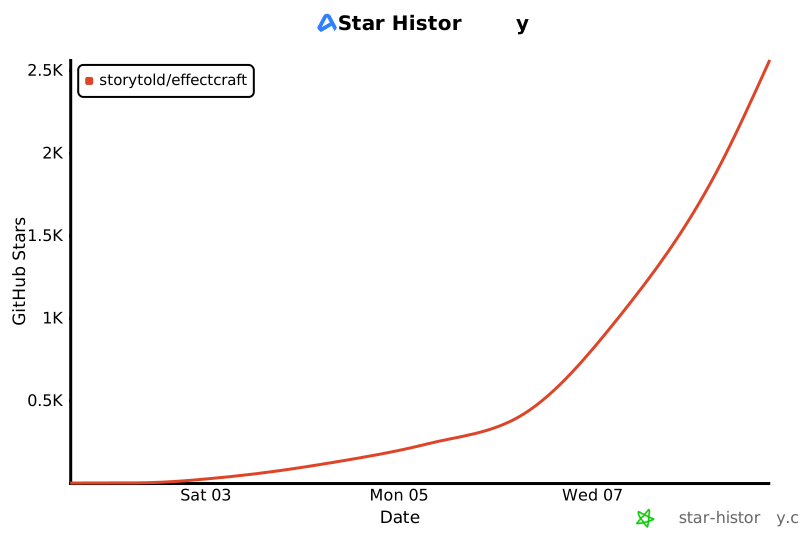](https://www.star-history.com/?repos=storytold%2Feffectcraft&type=date&legend=top-left)
|